Character Modes
Arrivals Board offers three ways to display text on the board. Each gives you a different balance of vintage authenticity and readability. You can switch between them anytime in Settings > Display.
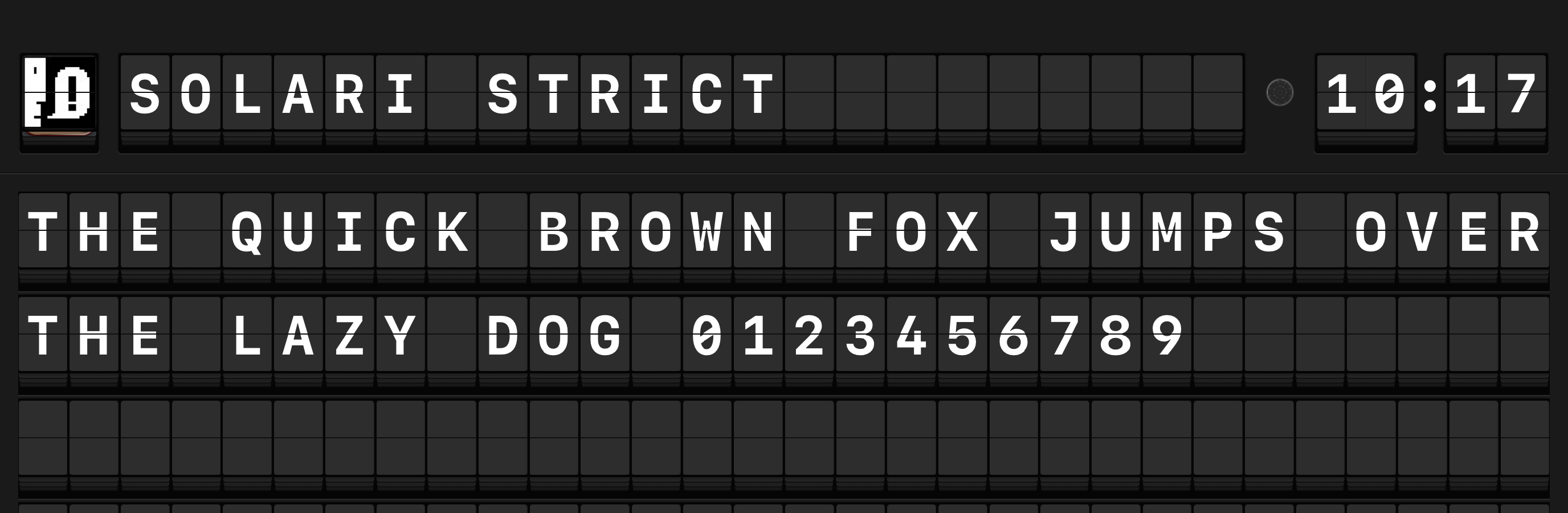
The three modes
Unicode Modern (default)
Everything displays in uppercase for the classic split-flap look. This mode supports accented characters, emoji, and custom Mastodon emoji, so international text and modern content display nicely.
Tip
Unicode Modern is the best all-around choice. Classic look, broad character support.
Unicode Modern Lowercase
Same broad character support as Unicode Modern, but preserves lowercase letters. The flaps still animate with that mechanical spin, but the text keeps its original casing.
When to use this
Choose this mode when readability matters more than vintage authenticity -- for example, when displaying long article summaries or social posts where mixed case makes text easier to read.
PHL Station Strict
The most authentic mode, limited to the characters found on a real split-flap display. Only uppercase letters, numbers, and basic punctuation are available. Anything else gets replaced:
| If the text contains... | It shows as... |
|---|---|
| Accented characters (e, a, u) | The base letter (E, A, U) |
| Emoji | A slash (/) |
| Other special characters | A dash (-) or period (.) |
Warning
PHL Station Strict strips accents and replaces emoji. If your sources include international text or emoji, one of the Unicode Modern modes is a better fit.
Comparison table
| Feature | Unicode Modern | Unicode Modern Lowercase | PHL Station Strict |
|---|---|---|---|
| Uppercase letters (A--Z) | |||
| Lowercase letters (a--z) | Converted to uppercase | Converted to uppercase | |
| Numbers (0--9) | |||
| Basic punctuation (. , ! ? etc.) | |||
| Accented characters | replaced with base letter | ||
| Emoji | replaced with / | ||
| Custom Mastodon emoji | not supported | ||
| Vintage authenticity | High | Moderate | Highest |
Which mode should I pick?
| If you want... | Use |
|---|---|
| The classic look with broad character support | Unicode Modern |
| Maximum readability for longer text | Unicode Modern Lowercase |
| The most authentic vintage experience | PHL Station Strict |
| International language support | Unicode Modern or Unicode Modern Lowercase |
| A data dashboard or home automation display | Unicode Modern |
You can switch anytime
Changing the character mode takes effect on the next message. Try each one and see what suits your setup best.