Display Settings
Display settings control how the board looks and how messages appear. Open Settings > Display to access these options.
Clock
| Setting | Options | Default |
|---|---|---|
| Show Clock | On / Off | On |
| 24-Hour Clock | On / Off | Based on your device locale |
Show Clock
Toggles the clock display in the upper-right corner of the board. When disabled, the clock area is reclaimed by the message body, giving you slightly more room for text.
Auto-hide on narrow boards
On very narrow boards (for example, when running in a compact window), the clock hides automatically regardless of this setting. There simply isn't room to display it alongside the sender name and indicator lamp.
24-Hour Clock
When enabled, the clock displays time in 24-hour format (e.g., 14:30). When disabled, it uses 12-hour format with AM/PM (e.g., 2:30 PM).
Display Characters
These settings control how characters appear on the board's flaps.
| Setting | Options | Default |
|---|---|---|
| Reel Type | Unicode Modern / Lowercase / PHL Station Strict | Unicode Modern |
| Font Color | White / Amber / Blue | White |
Reel Type
The reel type determines which characters are available on each flap:
| Reel Type | Characters included | Best for |
|---|---|---|
| Unicode Modern | A--Z, a--z, 0--9, punctuation, accented characters, emoji | Social media and international content |
| Lowercase | A--Z, a--z, 0--9, punctuation | Good readability without the full Unicode range |
| PHL Station Strict | A--Z, 0--9, limited punctuation | The most authentic split-flap look (uppercase only) |
Note
Characters not available in the selected reel type are replaced with the closest equivalent or a blank flap.
Font Color
| Color | Appearance |
|---|---|
| White | Classic white-on-black. High contrast and easy to read. |
| Amber | Warm amber/yellow. Evokes vintage split-flap displays. |
| Blue | Cool blue-white. A modern alternative. |
Animation
These settings control how the split-flap animation plays out when a new message arrives.
| Setting | Options | Default |
|---|---|---|
| Performance | Auto / Low / Medium / High | Auto |
| Animation Style | Classic / Express / Zippy | Classic |
| Max Express Flips | 1--20 | 6 |
Performance
Controls how hard the board pushes your device. Leave this on Auto unless you notice dropped frames, heat, or battery drain --- the app automatically matches the best tier for your hardware.
| Tier | Behavior |
|---|---|
| Auto | Picks a tier based on your device. Newer iPads and Apple TVs run at full fidelity; older hardware drops to Medium to stay smooth. |
| Low | Express animation, one flip per cell, 30 fps. Reverb on flip sounds is disabled to save continuous CPU. Best for older devices or when battery is a concern. |
| Medium | Express animation with up to 3 flips, 60 fps. A smoother look than Low while still staying well within the envelope of mid-generation hardware. |
| High | Uses your chosen Animation Style at full fidelity, 60 fps. |
Performance is a ceiling, not a lock
The app will still automatically drop below your pick when Low Power Mode is on or the device is thermally stressed. Choosing High doesn't override these safety nets --- it just sets the best-case ceiling.
Animation Style
| Style | Behavior |
|---|---|
| Classic | The most authentic split-flap experience. Each flap visits every reel position on the way to its target character, with pairs of flaps cascading together. |
| Express | Skips reel positions to reach the target character in fewer flips. Faster than Classic but still has the feel of a mechanical board. |
| Zippy | Each cell makes a single flip, cascading across the board in reading order. The fastest and most modern-feeling animation. |
Max Express Flips
Only available when the animation style is set to Express. Controls the maximum number of flips each cell makes before landing on its target character. Lower values are faster; higher values feel more mechanical.
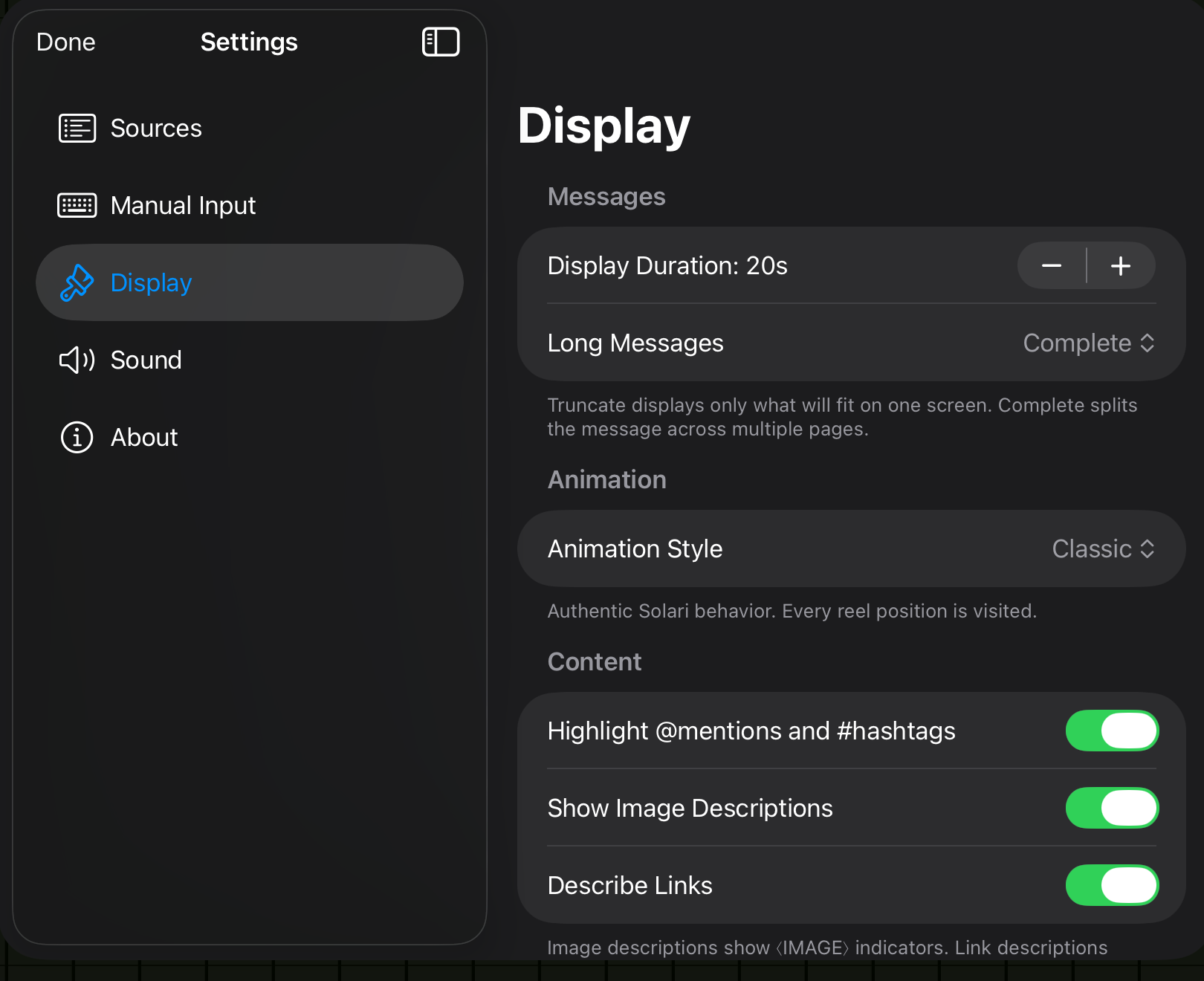
Messages
These settings control the timing and handling of messages on the board.
| Setting | Options | Default |
|---|---|---|
| Display Duration | 5--120 seconds (step 5) | 20 seconds |
| Long Messages | Truncate / Complete | Truncate |
Display Duration
How long each message stays on the board before the next one flips in.
- Short durations (5--15 seconds) work well for fast-moving, high-traffic feeds.
- Longer durations (30 seconds and above) are better for ambient displays or longer messages.
Long Messages
Controls what happens when a message is too long to fit on the board:
| Option | Behavior |
|---|---|
| Truncate | The message is cut off at the edge of the board. |
| Complete | The full message is shown across multiple pages, flipping automatically. |
Tip
Use Complete for RSS headlines or long social media posts. Use Truncate for a cleaner, faster-moving board.
Content
| Setting | Options | Default | Description |
|---|---|---|---|
| Highlight @mentions / #hashtags | On / Off | On | Adds a visual highlight to @mentions and #hashtags on the flaps. |
| Show Image Descriptions | On / Off | On | Displays alt text for images attached to social media posts. |
| Describe Links | On / Off | On | Replaces raw URLs with a short description of the linked page when available. |
Accessibility
Show Image Descriptions is especially useful for accessibility, making visual content readable on the text-only board.